Antons Video Productions
4 Woolpack Street
Braemar 2575 Southern Highlands
NSW Australia
+61 2 418 626 417
Automatic Logon for WinNT4, Win2k and WinXP
This fix will make it possible to boot your system without entering your password!
Start, Run, type regedit:
HKEY_LOCAL_MACHINE\SOFTWARE\Microsoft\WindowsNT\CurrentVers ion\Winlogon\
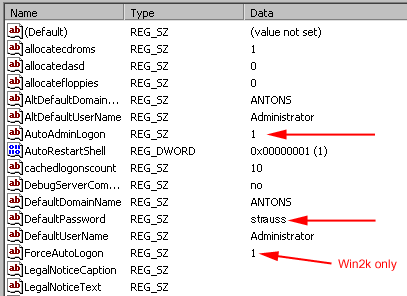
Create the following new strings by right clicking, then choose new string
Windows NT4 and XP
Add a new string named DefaultPassword and type the password in the value field
Add a new string named AutoAdminLogon and set the value to 1
Win2k
Add a new string named DefaultPassword and type the password in the value field
Add a new string named AutoAdminLogon and set the value to 1
Add a new string named ForceAutoLogon set value to 1