Antons Video Productions
4 Woolpack Street
Braemar 2575 Southern Highlands
NSW Australia
+61 2 418 626 417
Extract DMR-E20(30) VOB's for use in DVD authoring software
1. Place the DVD in the computer's DVD drive and copy the VOB or VOB's to your hard drive, then remove the "R" read only attribute from each VOB by right clicking, properties.
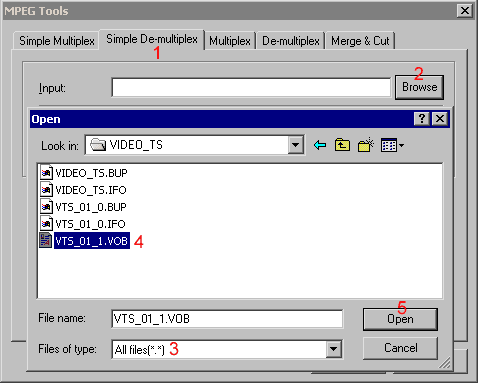
2. Open TMPGEnc and go to file, mpeg tools, choose Simple De-multiplex and browse for the VOB on your hard drive. Note: The DMR-E20 produces VOB files in 1GB chunks starting at *_1.VOB, *_2.VOB, *_3.VOB and *_4.VOB, so you may have to merge them first into one.
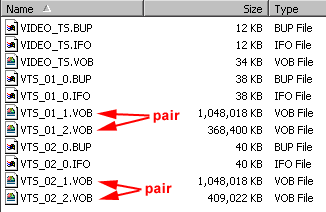
Note: If you recorded several segments with the DMR-E20(30), these will be numbered VTS_01, VTS_02 and so on. You can demux them without merging, unless they have exceeded the 1GB limit as seen below, in which case you have to merge the pair of each segment before demuxing. Up to 4 VOB's can be part of the pair example below.
3. Browse for a storage location for the resulting video and audio files and then click Run.
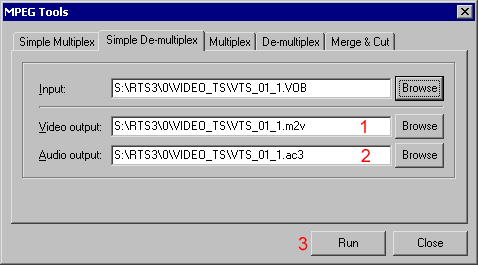
4. The resulting files can be used directly in ReelDVD authoring software.
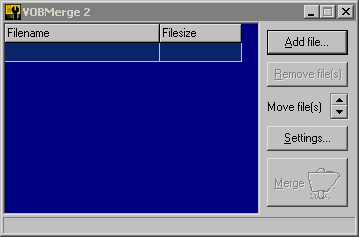
Merge multiple VOB files into one
If there are more than one VOB on the DMR-E20 DVD, you will need to combine them to a single VOB before doing any of the above. You will need to download a free tool called VOBMerge v2.00