Home
Awards
About Us
Contact Us
Digital Editing
Product Video
Training Video
Corporate Video
Induction Video
Seminar Video
Events Video
DVD Authoring
DVD Duplication
Video to DVD
Video Capture
Film to DVD
Video Dubbing
New Equipment
Used Equipment
Web Design
Web Hosting
Stock Footage
Useful Links
Antons Video Productions Sydney

DVD Lab Pro - Return to Last Menu with last button highlighted


1. Create your menus and movies as usual


2. Add the Last Menu Object to connection view
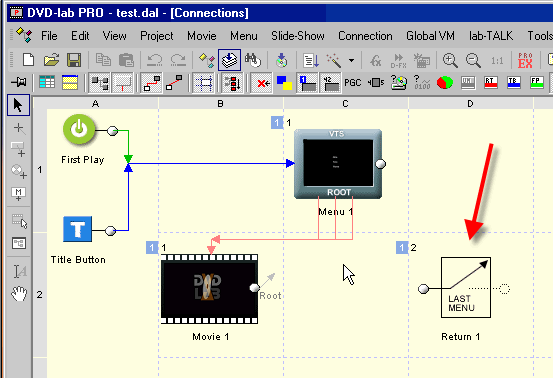
 

DVD Lab Pro Connection View


3. Select the Last Menu Object and set Don't Change
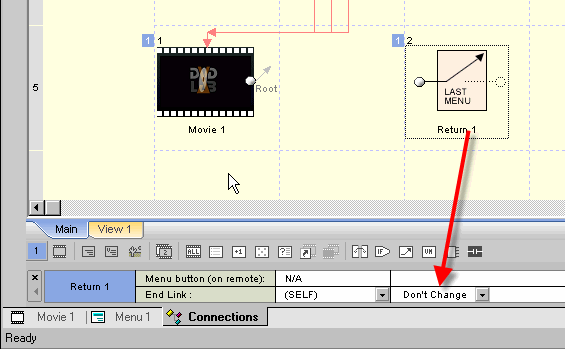
 

DVD Lab Pro Last Menu Object


4. Right click the Root Command and left click VTS Root VM
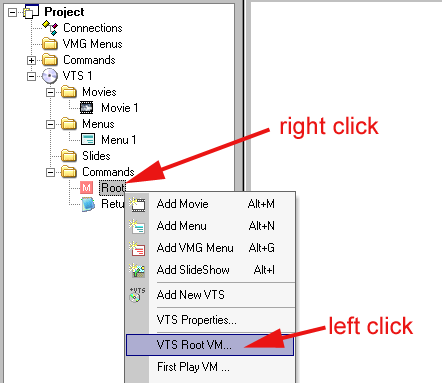
 

DVD Lab Pro Root Command


5. Click Override, then select Return1 from dropdown and click OK
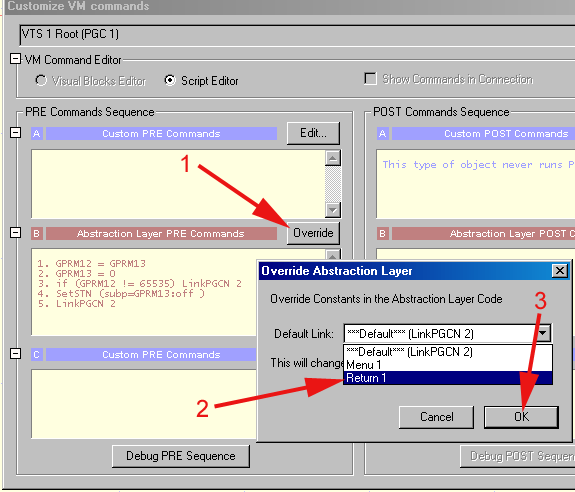
 

DVD Lab Pro Root Command Override


6. Done!


Back to Non-Linear and other Tutorials


Home - Contact Us - Video Tips and Tricks - Portrait & Wedding Photography