Antons Video Productions
4 Woolpack Street
Braemar 2575 Southern Highlands
NSW Australia
+61 2 418 626 417
EDIUS Audio limiting using izotope Mastering Limiter VST plugin
Note: This filter causes a 2 frame audio delay after export, so it is important that you export to wav audio file only, then replace the existing audio with the new file and offset it by 2 frames (or turn off existing audio and place the new one below and offset it)
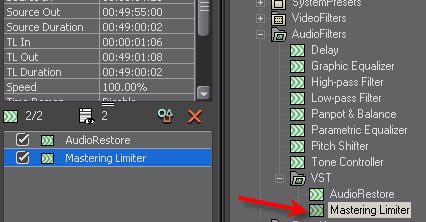
1. Drag and drop the Mastering Limiter VST to the audio clip on the timeline and then double click it in the info palette
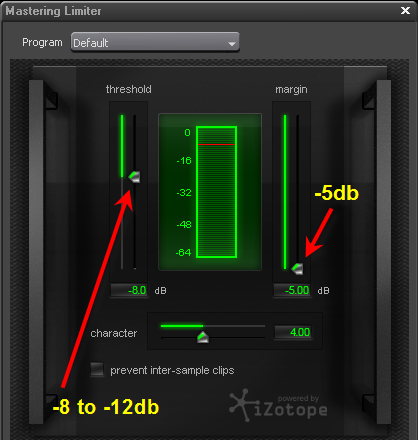
2. Drag the margin slider all the way down to -5db and drag the threshold to -8 to -12db
-8db will give a slight boost to lower level audio and limit the loudest bits to -5db
-12db will give a big boost to low level audio while limiting the loudest bits to -5db
You can use any other value in between, whatever produces the best sounding result
Back to more Video Editing Tips and Tricks