Antons Video Productions
4 Woolpack Street
Braemar 2575 Southern Highlands
NSW Australia
+61 2 418 626 417
EDIUS elementary stream MPEG export for DVD Authoring
1. Mark in and out on your HD or SD timeline, open the exporter and choose MPEG, then Elementary Stream Exporter.
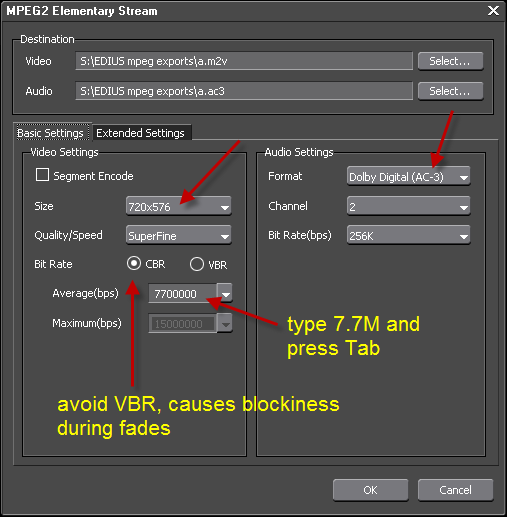
2. Be sure to use a maximum of 7700kbps (or less) for video and 256kbps for audio, set audio type to Dolby Digital AC-3
3. IMPORTANT, if project setting is HD, then you also need to change Size to NTSC 720x480 or PAL 720x576
NOTE: The EDIUS mpeg exporter uses all cores at 100%, as a result, the export will be lots faster than the duration of the timeline. EDIUS6 does a great job in downscaling from HD timeline to SD moeg for DVD.
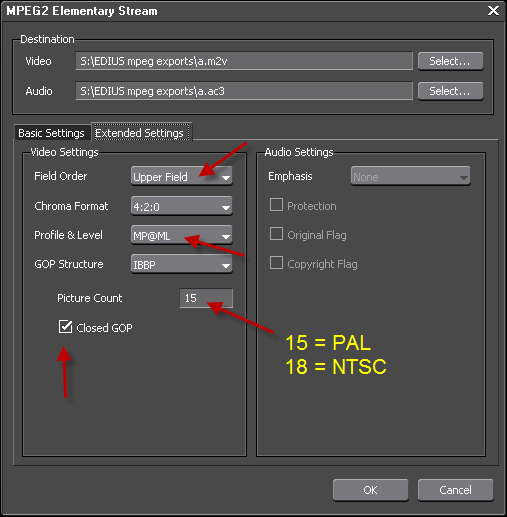
4. Go to Extended Settings, set field order to top field, set profile level to MP@ML, close GOP, set the correct GOP structure, 15 PAL and 18 NTSC
Back to more Video Editing Tips and Tricks