Antons Video Productions
20 Solander Ave
West Hoxton 2171 NSW, Australia
+612 9825 9999
How to recover a corrupt EDIUS 3 Project
In case an EDIUS project fails to open, there are several things you can try before tossing the PC out the window.
1. Sort project folder by type in windows explorer, then delete the contents of the rendered folder and delete all audio waveform files, then try opening the project.
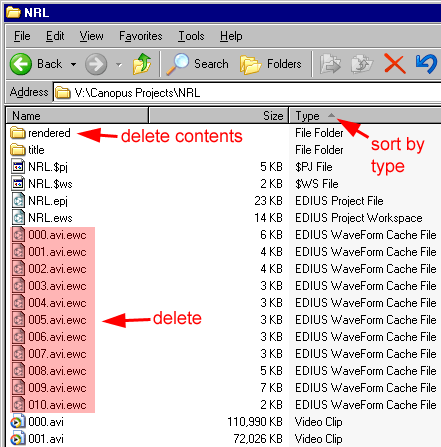
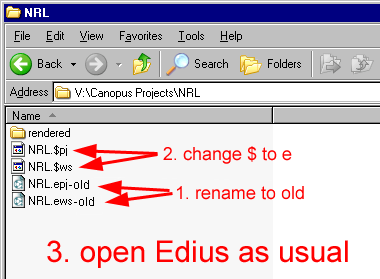
2. If the above was unsuccessful, use windows explorer and rename the two project files to old, then rename the auto backup files by replacing the $ with an e
3. if the above is unsuccessful, start a new project with the same settings as the corrupt one, such as OHCI DV 16:9 Pal etc. and then click save. Now click Merge and browse for the corrupt project file.
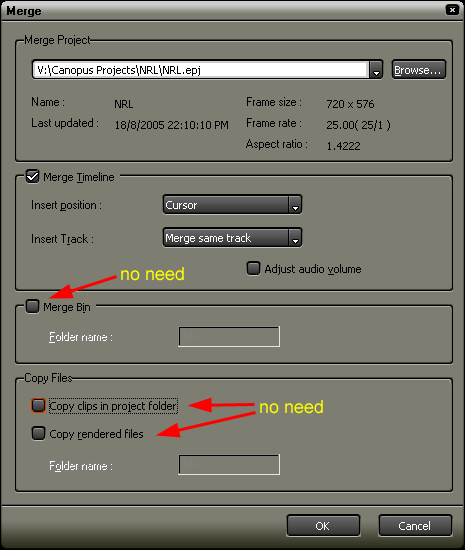
This will add all timeline clips from corrupt project file to new project file, if successful, press Shift+A to select entire timeline and drag to root bin, this will restore all thumbnails in bin.
4. If the above is unsuccessful, toss your PC out the window :)
5. I personally save a new project version approx. every 30 min, if all the above should fail, I can always go back to an earlier version.
Back to Non-Linear and other Tutorials