Antons Video Productions
4 Woolpack Street
Braemar 2575 Southern Highlands
NSW Australia
+61 2 418 626 417
Extract a DVD Recorder VOB for use in DVD-Lab authoring software
1. Place the DVD in the computer's DVD drive
2. Open DVD-Lab and go to project properties and set like this 
3. Right click in asset window and choose import, browse for the DVD drive, open the VIDEO_TS folder and select the first VOB in the set
4. Push the first radio button and tick both options as seen here:
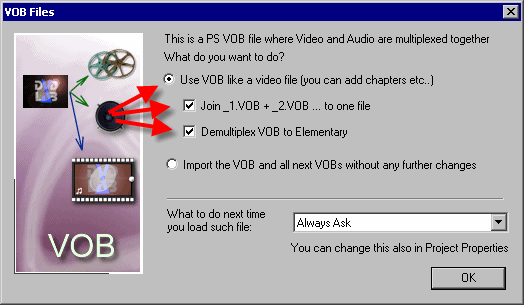
5. Browse for your DVD-Lab project folder
6. Go and have a coffee while demuxing and joining is in progress
7. When done, you will see an audio file and a video file, make sure both have an OK status as seen here
8. Now drag the video file to the empty movie place holder, then drag the audio file on top of the movie
Note: A single VOB set of a full DVD will look like this:
VTS_01_1.VOB
VTS_01_2.VOB
VTS_01_3.VOB
VTS_01_4.VOB
VTS_01_5.VOB
If the DVD contains more than one VOB set, the first VOB of the second set will look like this:
VTS_02_1.VOB
In case where there is more than one VOB set, you will need to repeat step 3, 4 and 5
Back to Non-Linear and other Tutorials