Antons Video Productions
20 Solander Ave
West Hoxton 2171 NSW, Australia
+612 9825 9999
EDIUS Audio Noise Reduction using Izotope Audio Restore VST plugin
Note: This filter causes a 2 frame audio delay after export, so it is important that you export to wav audio file only, then replace the existing audio with the new file and offset it by 2 frames (or turn off existing audio and place the new one below and offset it)
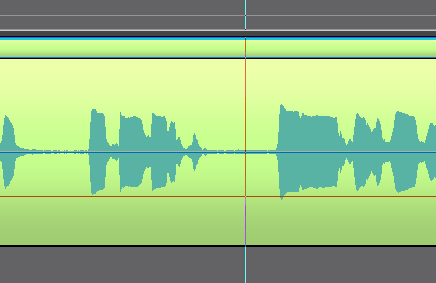
1. move timeline cursor to a position between spoken words so that only typical noise can be detected by the izotope learn function
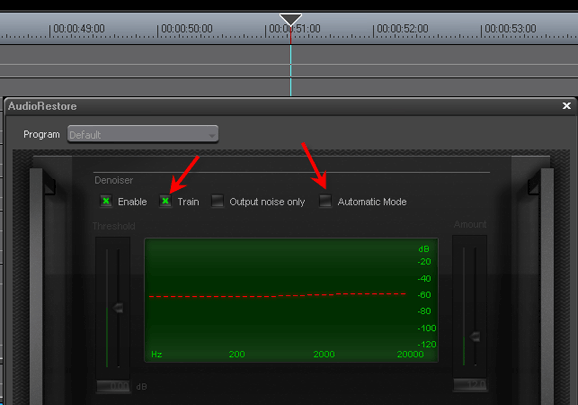
2. Drag and drop the izotope Audio Restore VST to the audio clip and then double click to open its interface, untick Automatic Mode and tick Train
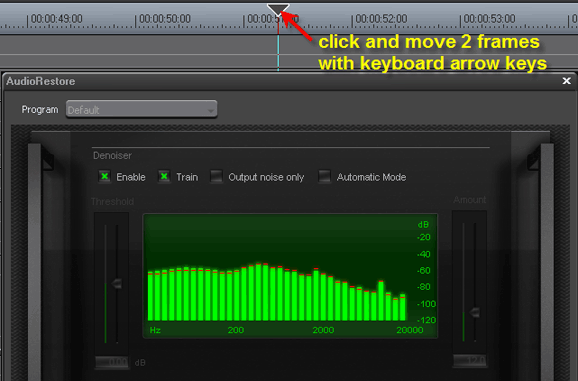
3. Click the timeline cursor and advance 2 or more frames by using the right arrow key on the keyboard, this will be enough to sample the noise
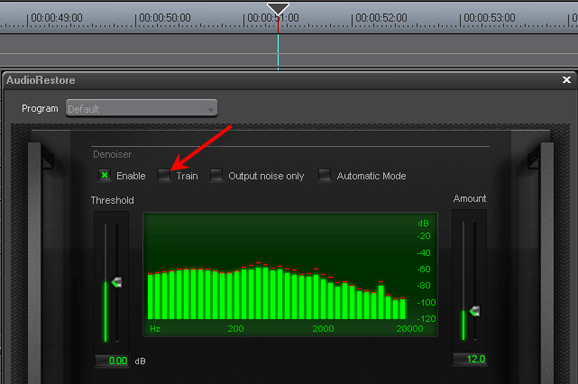
4. Untick Train and close the window by clicking the OK button
5. Play the clip on timeline and enjoy the noise free sound. Now you should apply the izotope Audio Mastering Limiter
Back to more Video Editing Tips and Tricks